







































Lab / diagnostics
Runs a diagnostic lab's bench: the test catalogue with reference ranges, every ordered test from sample to signed-off result, critical values phoned to the clinician, turnaround times, and the verified report for the patient and the referring doctor.
| At a glance | |
|---|---|
| Type | Business module |
| Group | Serve |
| Needs | Nothing. Tests are ordered as ordinary orders, so they are billed like any sale. |
| Included in | Diagnostic lab / pathology, Clinics |
| Offered to | Diagnostic lab / pathology, Clinics, Vet clinic & pet shop |
| Permissions | View lab (lab.view), Manage lab (lab.manage), Verify lab results (lab.verify) |
What it does
A test is a product, and ordering one is placing an ordinary order. Each order line is a test ordered, so billing, payment and tax need nothing new, and the lab module is the bench. There is no separate "new lab order" screen: a requisition is raised like any order (at the counter, the till or from a consultation), and its tests appear on the worklist.
Switching it on
Workspace → Modules → Lab / diagnostics → Enable (needs Manage modules). Lab and Tests appear under Serve.
The catalogue (Tests)
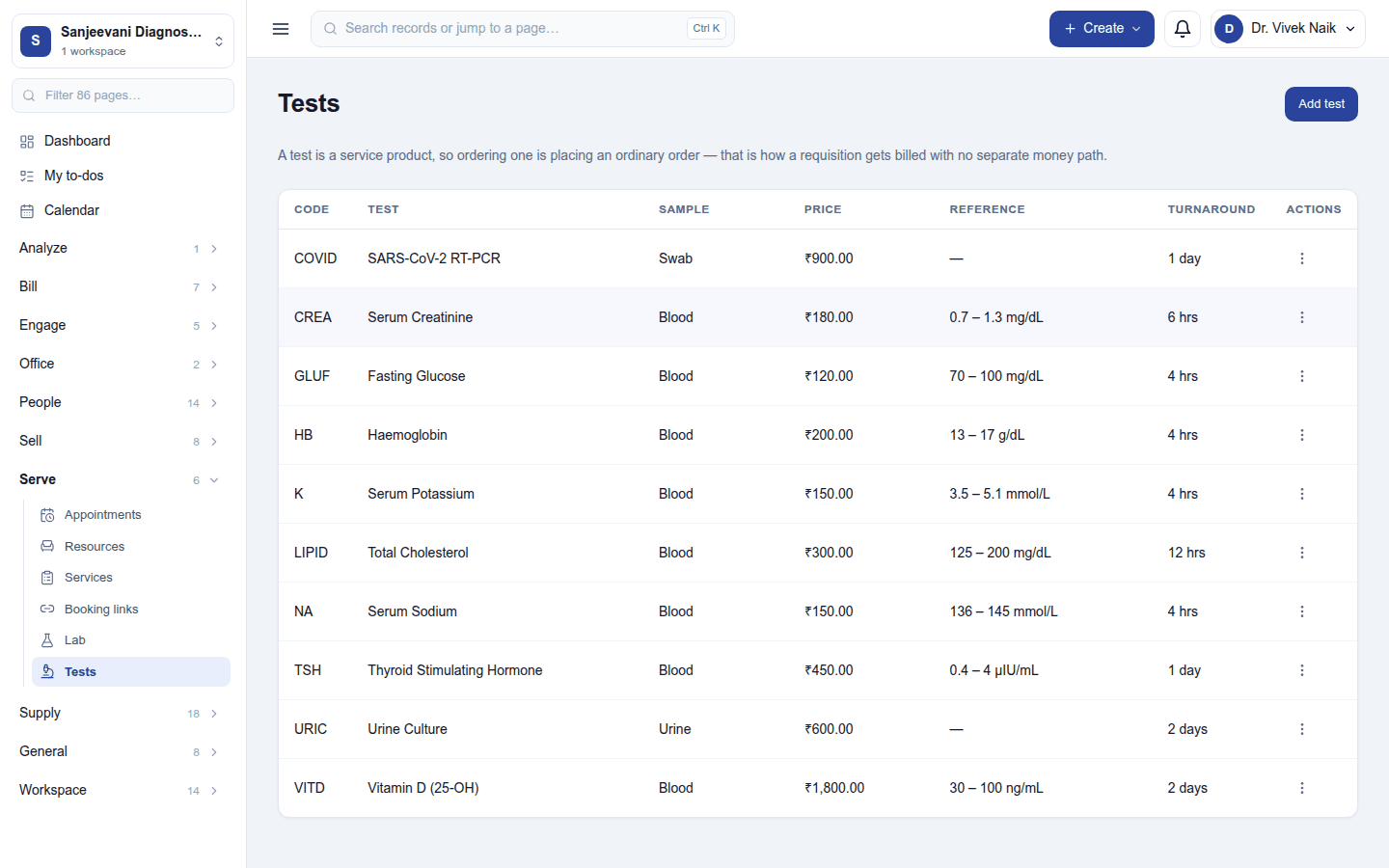
Serve → Tests: each test with its code, name, what is collected (blood, urine, swab …), unit, reference range, method, turnaround and price. Add test asks for:
| Field | What it is for |
|---|---|
| Name, code | Haemoglobin, HB |
| What is collected | The sample type |
| Unit | For a measured test, such as g/dL |
| Normal from / to | The reference range for a measured test |
| Expected answer | For a word test, such as Non-reactive |
| Critical low / high | At or beyond these, phone the clinician |
| Method | Printed on the report, such as ELISA |
| Turnaround (hours) | From collection to report |
| Price | What the patient is charged |
A test with neither a range nor an expected answer is reported without a flag, never as "normal". Withdraw from the menu stops a test being ordered; editing a range never changes results already reported.
The bench (Worklist)
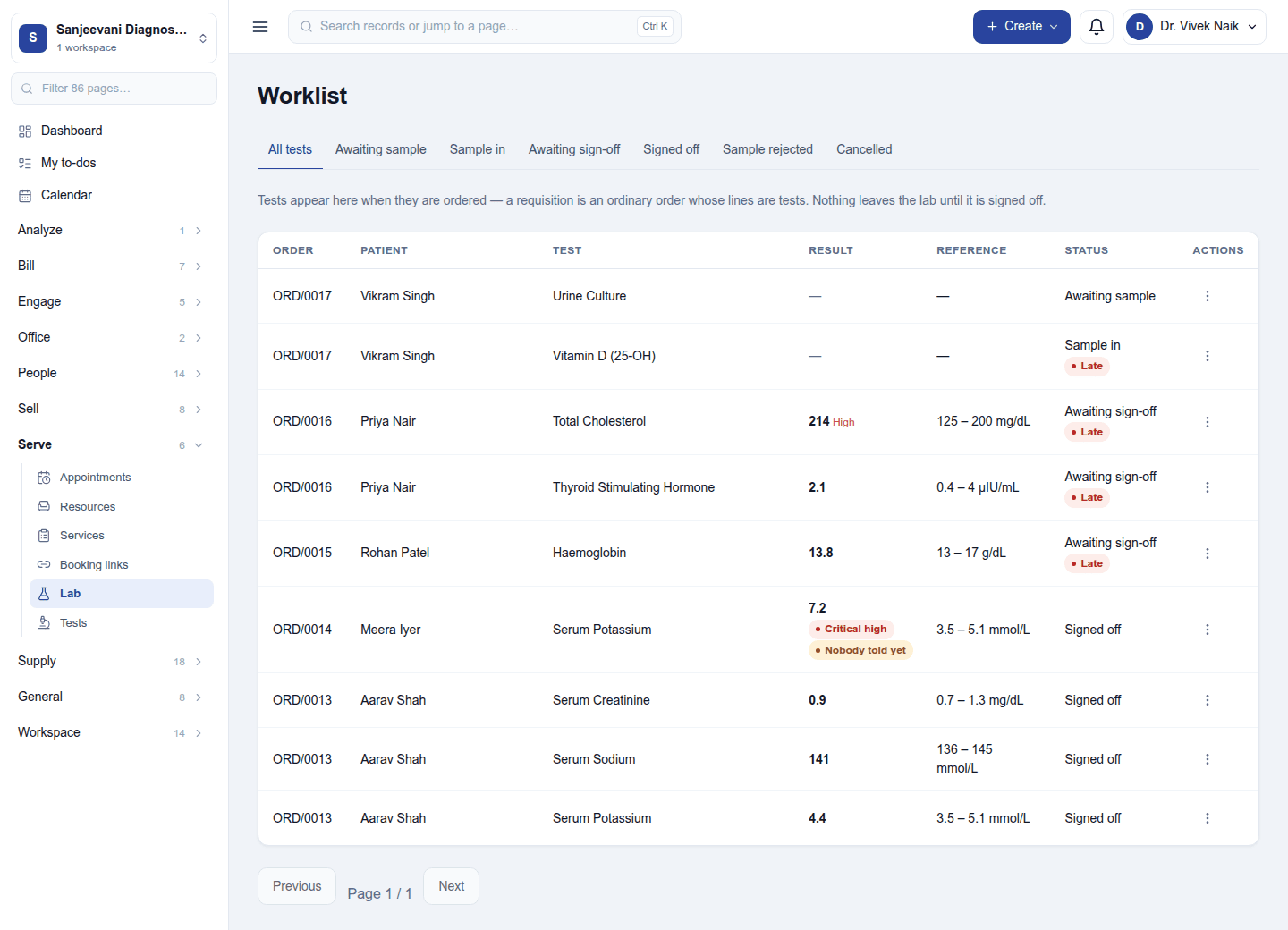
Serve → Lab lists every ordered test with its patient, order, sample, result, status and turnaround (Late when past its promise). Each test walks four steps:
| Status | Who | What happens |
|---|---|---|
| Awaiting sample | Phlebotomy | Ordered; Mark sample collected (or Not obtained) |
| Sample in | Technician | Enter result: the value is flagged against the range stamped at that moment |
| Awaiting sign-off | Pathologist | Sign off (needs Verify lab results) |
| Signed off | Releasable; Download report |
The status is per test, not per order: a blood count can be back in an hour while a culture takes three days. Amend result on a signed result sends it back for a second signature.
Critical values: a result at or beyond a critical limit raises the alarm as it is entered, and the call to the clinician is recorded: who was told, their role, how they were reached, and what they read back.
The report
Download report gives the PDF for the whole order, with only signed-off results, each with its range and flag, the referring practitioner and the method. The patient gets it in the customer portal under My reports.
Permissions
| Permission | Allows |
|---|---|
View lab (lab.view) |
See lab orders, samples and results. |
Manage lab (lab.manage) |
Keep the catalogue, collect samples and enter results. |
Verify lab results (lab.verify) |
Sign off a result so it can leave the lab. |
Ready-made automations
| Name | Kind | What it does | Starts |
|---|---|---|---|
| Tell me when a test result is late | Rule | An hour after a result was due and is still not out, tells the workspace owner. | On |
Turning it off
Lab and Tests leave the menu. Tests, results and reports are kept; tests already ordered stay on their orders.
In the desktop and mobile apps
Not carried.
Related guides
- Clinical records (EMR), Customer portal
- Module guides index