







































SMS (Twilio)
Sends text messages through the workspace's own Twilio account. It is the international route: no DLT registration is involved. Credits are bought in packs and never expire.
| At a glance | |
|---|---|
| Type | Add-on module |
| Group | Engage |
| Price | ₹100 for a pack of 1,000 SMS (list price) |
| Provides | Send SMS |
| Needs | Nothing |
| Offered to | Every industry pack |
| Permission | Manage add-ons (addons.manage) |
What it does
SMS (Twilio) gives the workspace the Send SMS capability, exactly as SMS (MSG91) does. The parts of the product that text people ask for the capability, not for a provider, so everything that works with MSG91 works with Twilio. Use Twilio for numbers outside India, or where no DLT-registered header exists.
Switching it on
- Go to Workspace → Modules and set the filter to Add-on modules. SMS (Twilio) is under Engage.
- Open its ⋮ menu and choose Enable.
- Fill in the dialog and press Enable.
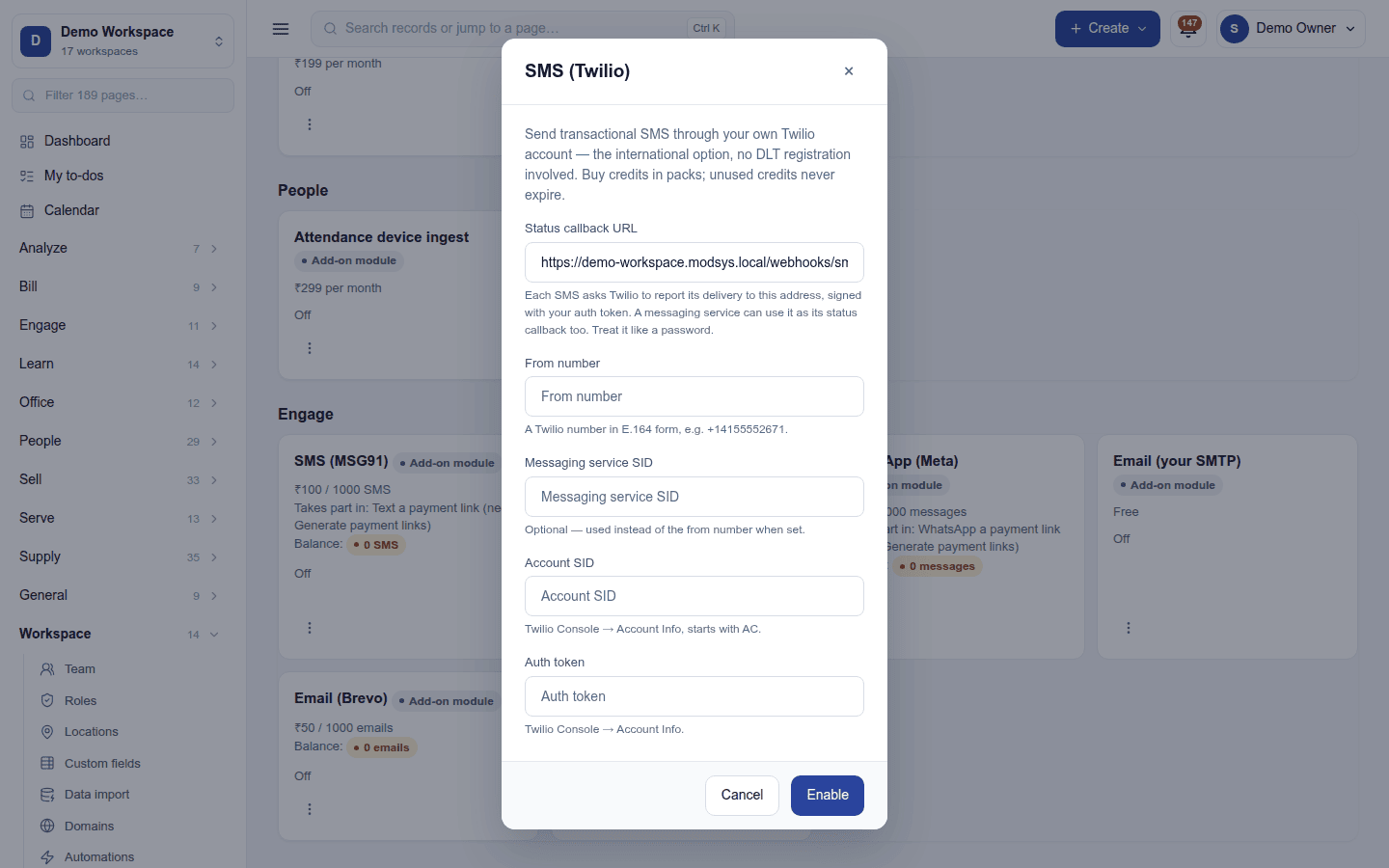
| Field | Required | What to enter |
|---|---|---|
| Status callback URL | (shown) | Read-only. Each SMS asks Twilio to report its delivery here, signed with the auth token. A Twilio messaging service can use it as its status callback too. Treat it like a password. |
| From number | Yes | A Twilio number in E.164 form, for example +14155552671. |
| Messaging service SID | No | Used instead of the from number when set. |
| Account SID | Yes | Twilio Console → Account Info. It starts with AC. |
| Auth token | Yes | Twilio Console → Account Info. |
The account SID and auth token are write-only once saved: the dialog shows only that they are on file, and a blank box keeps them.
Delivery reports: with the status callback in place, each message in Workspace → Message log moves on from sent to delivered or failed as Twilio reports it. A report is believed only when Twilio's signature matches the auth token.
Where it is used
The same places as every SMS provider:
- Settings → Notifications → SMS templates (SMS templates)
- Automations: Send a text message, and Text a payment link with Payment links
- Campaigns: the SMS channel
- POS pickup messages, Events messages and reminders, LMS learner messages, eSign one-time codes, Marketing automation journey steps and Surveys invitations
Credits and billing
Credits belong to the Send SMS capability, not to Twilio, so a balance is shared if the workspace also holds SMS (MSG91):
- A plan's included allowance resets at each renewal; packs bought on top never expire. The allowance is spent first.
- At zero, sending stops. The owner is warned by email the first time the balance falls under 50.
- A rejected message is not charged, and a retried one is charged once.
The balance shows on the card; Usage and credits on the Modules screen lists each movement.
Two SMS providers
With both SMS add-on modules on, one is the serving provider (the Default badge). A newly enabled one waits as a stand-by. Make default on its ⋮ menu switches sending over at once.
Turning it off
Turn off on the ⋮ menu asks first and keeps the settings and keys. Anything that depends on sending SMS stops, unless the other SMS provider is on and becomes the serving one.
Ready-made automations
None of its own. The SMS ready-made rule (Text the customer when an order is completed) belongs to the capability; see SMS (MSG91).
In the desktop and mobile apps
Nothing to set up in the apps. Texts the server sends use the serving provider.